Real-Time Translation in 3 Simple Steps
Set up once, go live, and let your congregation follow along in their own language—in church or watching from home.
- 1One-time setup
Set up your translation
Your media team creates a free account, connects your church’s audio, and selects the languages to translate from and into.
- Create a free account—no credit card needed
- Select your audio input
- Choose input and output languages
- Select multiple languages, or use Bundle to switch automatically between two languages
- Receive three sharing links:
- Guest Phone link + QR code
- Room Speaker link for headset systems
- Overlay link for church screens using ProPresenter or OBS
- 2Go live
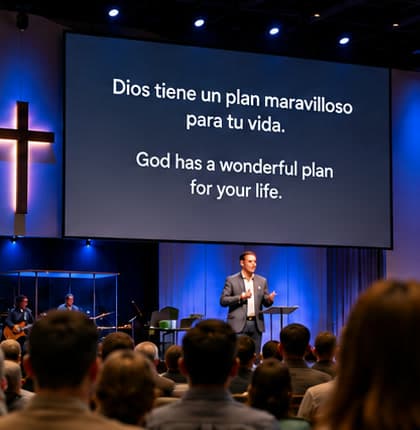
Display live captions on church screens
Click “Go Live” and translated captions follow the speaker in real time.
Choose the font size and position of the text: top, middle, or bottom.
- 3Optional for guests
Follow along on your phone—in church or at home
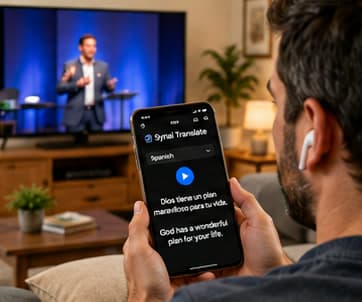
Both in-person and virtual guests can receive live translated text and audio on their phones.
- 1. Scan the church’s QR code or open the shared Guest Phone link.
- 2. Choose your preferred language.
- 3. Tap Play to read and listen to the translation.
- No app or download required.
In churchRead the translation on your phone during the service.
 Watching from home
Watch the service on TV or a computer while reading on your phone and listening through earbuds.
Quick & Easy Setup for Your Media Team
Set up your church’s translation, connect your audio, and share access in church and online.
- 1
Create Your Account
Visit synaitranslate.com and create a free account.
No credit card required.
- 2
Connect Your Audio
Make sure the church’s audio signal is available to your computer.
Select the desired audio input, such as a microphone.
- 3
Select Languages
Choose the input languages being spoken and the output languages to translate into.
Multiple input and output languages can be selected.
When speakers alternate languagesEnable Bundle to switch automatically between two languages.
- 4
Set Up Your Sharing Links
The system generates three links:
- Guest Phone link + QR code
Share with in-person and virtual guests for text and audio on their phones. Guests scan or open the link, choose a language, and tap Play. No app download needed.
- Room Speaker link
Connect your church’s headset system for guests without phones.
- Overlay link
Add to ProPresenter or OBS to display translations on church screens. Place the overlay on the slides or scenes where captions should appear.
- 5
Go Live
Click “Go Live” to start translation.
Live captions follow the speaker in the selected output languages.
Adjust caption font size and position: top, middle, or bottom.
Guests can read and listen on their phones—in church or while watching from home.
Everything You’ll Get
- Guest Phone link + QR code
- Room Speaker link for headsets
- Overlay link for church screens
- Live text and audio for in-person and virtual guests
- No app download for guests
What you need on Sunday.
One computer at the sound desk and the internet. Setting up takes about half an hour, once — rehearse on a weekday with the real sound system.
You need
- Sound from your sound desk, through a USB audio interface or a Dante channel. A laptop’s own microphone in a hall gives poor captions.
- A computer running the Console in Chrome or Edge, plugged in, on a network cable if you can.
- An internet connection.
- No sound desk? One iPhone or Android phone does it, with its own microphone.
You don’t need
- Receivers or headsets to hand out
- An app or an account for guests: they scan a QR code
- A volunteer interpreter for each language
- Anything to install for the Console: it runs in the browser
Works with what you already use.
Captions come as one overlay link: a web page that shows nothing but the captions — transparent, no controls, no sign-in. Add it once as a web item and it follows every service.
| Where | How captions get there | |
|---|---|---|
| ProPresenter | The overlay link as a Web object on a slide; captions render over your output. | Guide |
| OBS Studio | The overlay link as a Browser source on top of your scene; OBS keys it over your video. | Guide |
| vMix | The overlay link as a Web Browser input on an overlay channel, over whatever is on program. | Guide |
| FreeShow | The overlay link as a Website item inside an overlay. | Guide |
| Any screen, no software | The overlay link full screen in a browser on the computer wired to the screen, with a background colour. | Guide |
| Guests’ phones | They scan the QR code and read captions or listen to translated voice. No app, no account. | Guide |
Use the web item, not your software’s own captions feature: that one connects to a different service and cannot show these captions.
Start free, then choose the plan that fits your services.
Plans are sized by monthly translation time, with captions, translation and translated voice included in every one.
- Captions and voice in 60 languages
- Set the spoken language, or let Synai detect it
- Standard voice included
- $4.90 per translation-hour
- Captions and voice in 60 languages
- Set the spoken language, or let Synai detect it
- Standard voice included
- $4.45 per translation-hour
- Captions and voice in 60 languages
- Set the spoken language, or let Synai detect it
- Standard voice included
- $4.23 per translation-hour
- Captions and voice in 60 languages
- Set the spoken language, or let Synai detect it
- Standard voice included
- $3.98 per translation-hour
Answers, before you have to ask.
What if our volunteers aren't tech-savvy?
The portal is designed for the church office, not for IT departments. Most volunteers are comfortable after one 30-minute session, and our support team is real people who answer the phone.
How does Live Translation time get used up?
Your included time is counted per translated language, and one language is the rate the plans are sold at, so an hour of a one-language service is an hour of your allowance. Captions, translation and translated voice for that language are all included in it.
Every extra language you translate at the same time counts as its own hour, so two languages use your time twice as fast as one. Muting the microphone pauses the clock entirely, and the translation service you pick makes no difference to the rate.
On the 10 h plan, that works out as:
1 language: 1x, so 10 h of allowance covers 10 h of live service.
2 languages: 2x, so 10 h of allowance covers 5 h of live service.
3 languages: 3x, so 10 h of allowance covers 3 h 20 m of live service.
The Live console always shows the rate you are running at, with the time you have left this month.
Is there a contract?
No long-term contract. Monthly plans renew each month and yearly plans each year. Cancel anytime: your plan runs to the end of the period you paid for, and your data is always yours to export. We'd rather earn your renewal every Sunday.
Book a free session and hear it in your church.
Pick a time that works — we’ll show your team Live Translation with your own Sunday in mind: your languages, your sound desk, your screens.